The competition for India’s premier National Law Universities has reached unprecedented levels. Last year, over 60,000 students competed for just 3,000 seats across top law schools. With CLAT 2026 registration opening in August 2025, preparation must begin immediately.
This examination represents far more than a standardized test. It serves as the gateway to 26 National Law Universities that shape future legal leaders, judges, and policymakers. The application process demands absolute precision—a single error in documents or missed deadlines could eliminate candidacy entirely.
Unlike standard college application forms, the CLAT system employs AI-powered validation technology that flags inconsistencies instantly. During the previous cycle, approximately 1 in 5 applications faced rejection due to preventable mistakes. Understanding three critical elements—registration timelines, eligibility verification, and document preparation—determines success.
The Consortium of NLUs activates the portal for CLAT 2026 online submissions precisely at 10:00 AM IST on launch day. Many applicants overlook this timing detail until opportunities vanish.
Key Takeaways
- Registration Window: Opens August 2025 with strict October deadline
- Participating Institutions: 26 National Law Universities accept CLAT scores
- Document Preparation: Digital copies of ID proofs and academic records require early preparation
- Category Certificates: Format requirements demand careful verification
- Payment Issues: Account for 12% of incomplete applications annually
- Official Portal: Bookmark consortiumofnlus.ac.in for real-time updates
- Technical Requirements: Browser compatibility and file specifications affect submission success
Understanding CLAT 2026: The Gateway to Legal Excellence
The Common Law Admission Test (CLAT) represents India’s most prestigious law entrance examination. Each year, tens of thousands of aspirants compete for limited seats at elite National Law Universities and affiliated private institutions.
What is CLAT?
CLAT assesses five core competencies through 120 multiple-choice questions:
- Legal Reasoning: Analysis of legal principles and case scenarios
- Logical Reasoning: Pattern recognition and argument evaluation
- English Language: Comprehension and grammar proficiency
- Current Affairs: National and international developments
- Quantitative Techniques: Basic mathematical applications
The examination duration spans two hours, with each correct answer earning one mark and incorrect responses incurring 0.25-mark deductions. This negative marking system rewards accuracy over guesswork.
In 2025, over 75,000 students registered for CLAT, demonstrating the examination’s critical importance in legal education pathways. The test format underwent significant reforms in 2020, shifting toward passage-based questions that mirror law school pedagogy.
For comprehensive preparation strategies, explore CLAT 2026 study approaches that align with current examination patterns.
Why Registration Accuracy Determines Success
Registration represents the non-negotiable first step toward CLAT participation. Without successful registration, examination center allocation remains impossible, regardless of preparation quality.
Statistical analysis from 2025 reveals concerning trends:
Registration Metrics (2025 Cycle)
| Metric | Data |
|---|---|
| Total Application Attempts | 78,432 |
| Successfully Registered Candidates | 72,189 |
| NLU Seats Available | 3,240 |
| Top 3 NLU Cutoffs | 98+ percentile |
| Rejection Rate | 12% |
The 12% rejection rate stemmed primarily from:
- Late submission beyond deadline extensions
- Incorrect document formats
- Category certificate discrepancies
- Payment gateway failures
- Incomplete information fields
Registration also determines examination center preferences and National Law University selection order. The system allocates centers based on availability and submission timing—early registrants receive priority for preferred locations.
Premier National Law Universities Participating in CLAT 2026
CLAT 2026 provides access to India’s most distinguished legal institutions:
Tier-1 NLUs (Cutoff: 98+ percentile)
- National Law School of India University (NLSIU), Bangalore
- NALSAR University of Law, Hyderabad
- West Bengal National University of Juridical Sciences (WBNUJS), Kolkata
- National Law University, Delhi
- Gujarat National Law University, Gandhinagar
Tier-2 NLUs (Cutoff: 95-98 percentile)
- Rajiv Gandhi National University of Law, Patiala
- Hidayatullah National Law University, Raipur
- National University of Advanced Legal Studies, Kochi
- Ram Manohar Lohiya National Law University, Lucknow
- National Law University, Jodhpur
Tier-3 NLUs (Cutoff: 90-95 percentile)
- Chanakya National Law University, Patna
- Damodaram Sanjivayya National Law University, Visakhapatnam
- Tamil Nadu National Law University, Tiruchirappalli
- Maharashtra National Law University, Mumbai
- National Law University Odisha, Cuttack
Admission depends on CLAT rank and preference order submission. For instance, NLSIU Bangalore typically admits the top 150 rank holders for approximately 120 general category seats, accounting for reservation policies.
Strategic university selection requires analyzing historical cutoff trends, campus placement records, faculty expertise, and specialization offerings. Learn more about avoiding common CLAT pitfalls during university selection.
CLAT 2026 Registration Timeline: Critical Dates and Deadlines
Time management during the registration period separates successful applicants from those who miss opportunities. The CLAT 2026 registration timeline follows a structured three-month window with zero tolerance for delays.
Registration Timeline Overview
Phase 1: Pre-Registration Preparation (June-July 2025)
- Late June 2025: Official notification release on consortiumofnlus.ac.in
- Early July 2025: Detailed information brochure publication
- Mid-July 2025: Helpdesk activation for preliminary queries
Phase 2: Active Registration Period (August-October 2025)
- First Week of August 2025: Portal opens at 10:00 AM IST sharp
- August-September 2025: Primary registration window
- Third Week of October 2025: Final submission deadline (no extensions granted)
- Last Week of October 2025: System closes automatically at 11:59 PM IST
Phase 3: Post-Registration Activities (November 2025)
- Early November 2025: Correction window opens (72-hour duration)
- Mid-November 2025: Admit card release
- December 2025: Examination date (typically first or second Sunday)
Critical Timing Considerations
Historical data reveals concerning patterns. In 2025, over 6,500 applicants missed the October cutoff, forfeiting their entire year’s preparation. The system employs automatic rejection protocols for late submissions—no manual overrides exist.
Recommended Action Timeline
| Time Period | Action Items |
|---|---|
| June 2025 | Gather all physical documents; verify academic certificates |
| July 2025 | Create digital scans; bookmark official portal |
| Early August 2025 | Complete registration within first week |
| September 2025 | Review and verify all entered information |
| Early October 2025 | Final submission with buffer time for technical issues |
Working professionals and students balancing board examinations should initiate document collection by June 2025. This buffer prevents work-related or academic schedule conflicts from disrupting registration.
Server congestion peaks during the final 48 hours before deadline. In 2024, 43% of applicants encountered technical difficulties during this period, including:
- Extended page load times (5+ minutes)
- Payment gateway timeouts
- Document upload failures
- Session expiration errors
Submit applications before the final week to avoid these preventable complications. The Consortium provides no deadline extensions, regardless of technical difficulties during peak periods.
For students managing concurrent academic responsibilities, review strategies for balancing school and CLAT preparation effectively.
Eligibility Requirements: Academic, Age, and Category Criteria
CLAT 2026 eligibility encompasses three distinct dimensions: academic qualifications, age restrictions, and reservation category verification. Each component requires careful documentation and verification.
Academic Qualifications for Undergraduate Programs
General and OBC-NCL Categories
Candidates must secure minimum 45% aggregate marks in Class 12 examinations from recognized boards. This threshold applies across all education systems:
- Central Board of Secondary Education (CBSE)
- Council for the Indian School Certificate Examinations (CISCE)
- State education boards
- International boards (with equivalence certification)
SC/ST Categories
Reserved category candidates require 40% aggregate marks in qualifying examinations.
Calculation Examples
| Board Type | Total Marks | Required for General | Required for SC/ST |
|---|---|---|---|
| CBSE (500 per subject × 5) | 2,500 | 1,125 marks | 1,000 marks |
| State Boards (100 per subject × 6) | 600 | 270 marks | 240 marks |
| ICSE (100 per subject × 5) | 500 | 225 marks | 200 marks |
Special Cases
- Candidates appearing in Class 12 examinations (March/April 2026) qualify for provisional registration
- Results must be declared before counseling commencement
- International board students must obtain equivalence certificates from the Association of Indian Universities (AIU)
- Cambridge A-Levels, International Baccalaureate (IB), and other foreign curricula require official conversion documentation
Academic Qualifications for Postgraduate Programs
LLM aspirants must possess:
- Bachelor of Laws (LLB) degree from Bar Council of India-recognized universities
- Minimum 50% aggregate marks (45% for SC/ST candidates)
- Final year LLB students qualify provisionally
Age Limit Criteria: Flexibility and Restrictions
Undergraduate Programs
CLAT 2026 imposes no upper age limit for five-year integrated BA LLB programs. This policy change in 2022 opened opportunities for career changers and mature students.
Statistical analysis from 2024 reveals:
- 19% of applicants exceeded 25 years of age
- 7% of successful candidates were over 30 years old
- Oldest admitted student: 42 years (NLIU Bhopal)
Minimum Age Requirement
Candidates must complete 20 years of age by the admission date for undergraduate programs.
Postgraduate Programs
LLM programs maintain a maximum age limit of 30 years for general category candidates, with relaxations:
- SC/ST: 35 years (5-year relaxation)
- OBC-NCL: 33 years (3-year relaxation)
- PwD: 35 years (5-year relaxation)
Reservation Policies and Category Requirements
The CLAT examination follows constitutional reservation mandates:
Horizontal Reservations
| Category | Reservation Percentage | Certificate Requirement |
|---|---|---|
| Scheduled Castes (SC) | 15% | State government-issued SC certificate |
| Scheduled Tribes (ST) | 7.5% | Tribal affairs department certificate |
| Other Backward Classes (OBC-NCL) | 27% | Non-creamy layer certificate (valid for current financial year) |
| Economically Weaker Sections (EWS) | 10% | Income and asset certificate (issued after March 31, 2025) |
| Persons with Disabilities (PwD) | 5% (across all categories) | Medical board certificate (minimum 40% disability) |
Critical Certificate Requirements
SC/ST Certificates Must Include:
- Both parents’ caste details
- Issuing authority’s official seal and signature
- District magistrate or authorized revenue officer attestation
- Certificate validity confirmation
OBC-NCL Certificates Must Specify:
- Creamy layer exclusion status
- Issue date after March 31, 2025 (for CLAT 2026)
- Central government format compliance
- Caste inclusion in Central OBC list
EWS Certificates Require:
- Annual family income below ₹8 lakh
- Agricultural land holdings below 5 acres
- Residential property specifications
- Competent authority signature (Tehsildar or above)
PwD Certificates Need:
- Medical board composition (minimum 3 specialists)
- Disability percentage (minimum 40% for reservation benefits)
- Disability type specification (locomotor, visual, hearing, etc.)
- Validity period confirmation
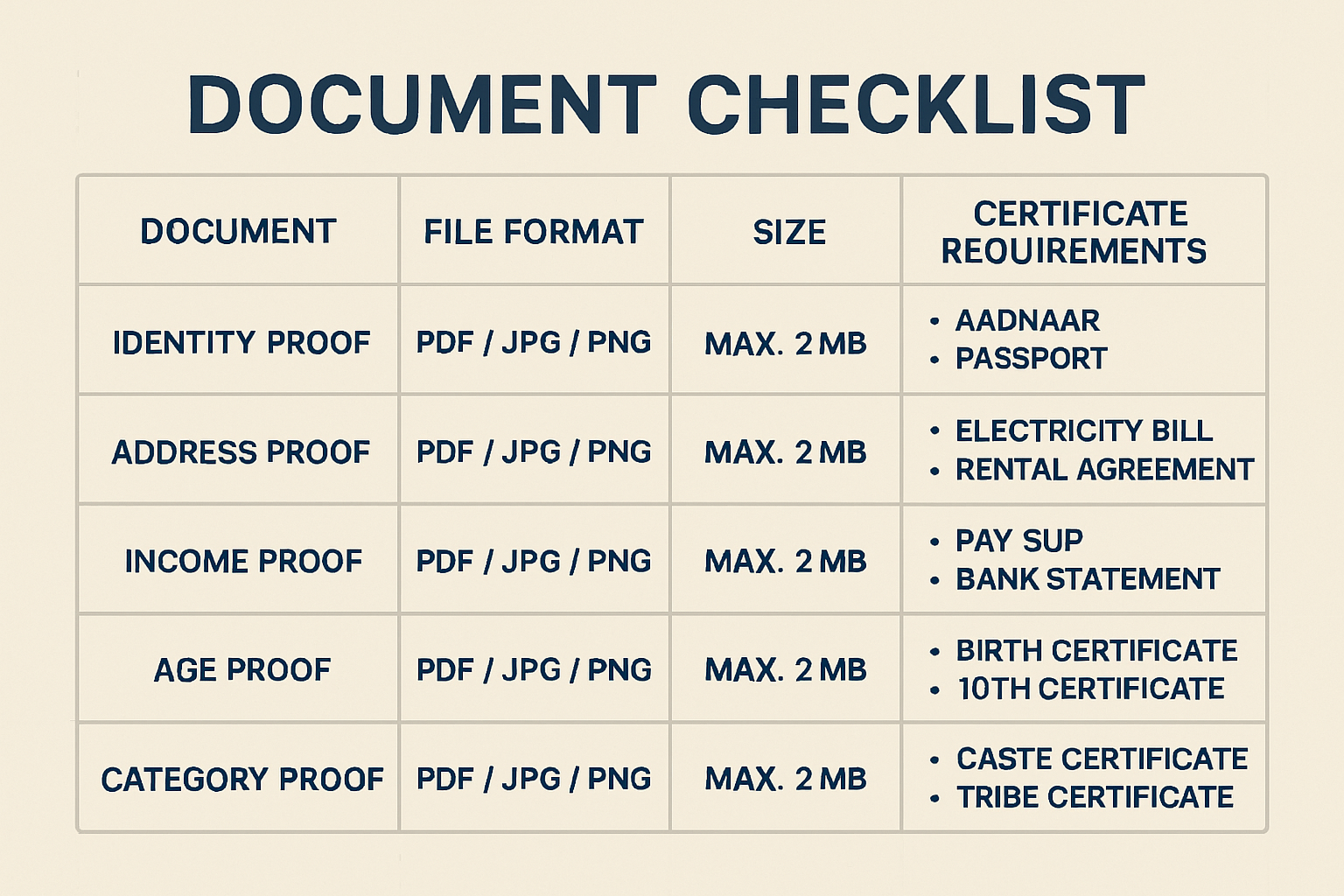
Upload certificates in PDF format, maximum 1.5MB size, with clear, legible scans at 300 DPI resolution. Blurred or illegible documents trigger automatic rejection.
For detailed guidance on coaching selection during preparation, review mistakes to avoid when choosing online CLAT coaching.
Essential Documents for CLAT 2026 Registration
Document preparation represents the most common failure point in CLAT applications. Twenty-three percent of 2025 applications faced rejection due to missing, incorrect, or improperly formatted documents.
Mandatory Documents Checklist
Personal Identification Documents
- Passport-size photograph
- Format: JPEG only
- Dimensions: 200 × 230 pixels
- File size: 50KB-100KB
- Background: Pure white (#FFFFFF)
- Face coverage: 70-80% of frame
- Recent capture: Within 3 months
- Signature specimen
- Format: PNG or JPEG
- Dimensions: 140 × 60 pixels
- File size: 20KB-50KB
- Medium: Black ink on white paper
- Style: Candidate’s usual signature (not block letters)
- Government-issued ID proof
- Aadhaar card (preferred)
- PAN card
- Passport
- Voter ID card
- Format: PDF
- Size: Under 1MB
Academic Documents
- Class 10 marksheet/certificate
- Proof of date of birth
- Board seal clearly visible
- All pages included if multi-page document
- Class 12 marksheet or provisional certificate
- Aggregate percentage calculation
- Board authentication
- For appearing candidates: school bonafide certificate
- Degree certificate (for PG applicants)
- LLB provisional or final degree
- Consolidated marksheet
- University seal and signature
Category-Specific Documents
- Caste certificate (SC/ST/OBC-NCL)
- Issuing authority: District Magistrate/SDM/Tehsildar
- Validity: Current financial year for OBC-NCL
- Format compliance: Central government template
- EWS certificate
- Income certificate (family income below ₹8 lakh)
- Asset declaration
- Issue date: After March 31, 2025
- PwD certificate
- Medical board composition details
- Disability percentage (minimum 40%)
- Specific disability type mentioned
- Validity period
Additional Supporting Documents
- Domicile certificate
- Required for state quota claims
- Issued by competent state authority
- Validity confirmation
- BPL certificate
- Ration card (Antyodaya/Priority household)
- State government BPL certification
- Current validity status
Document Preparation Best Practices
Scanning Specifications
- Resolution: 300 DPI minimum for clarity
- Color mode: Color for photographs; grayscale acceptable for documents
- Orientation: Portrait mode (not landscape or inverted)
- Cropping: Remove unnecessary borders while retaining official seals
File Naming Conventions
Use clear, descriptive names:
Firstname_Lastname_Photograph.jpgFirstname_Lastname_Signature.pngFirstname_Lastname_Class12_Marksheet.pdfFirstname_Lastname_Caste_Certificate.pdf
Avoid special characters, spaces, or ambiguous abbreviations.
Quality Verification
Before uploading:
- Zoom to 200% and verify text readability
- Check for shadows, glare, or distortion
- Ensure all four corners of documents are visible
- Confirm color accuracy (especially for photographs)
Compression Tools
If files exceed size limits:
- Use Squoosh.app for image compression
- Adobe Acrobat for PDF optimization
- ILovePDF for batch processing
- Maintain quality while reducing file size
Category Certificate Guidelines: Avoiding Common Errors
SC/ST Certificate Errors to Avoid
- Missing parent caste details (both parents must be mentioned)
- Outdated certificates (issued more than 3 years ago may face scrutiny)
- Incorrect issuing authority (must be District Magistrate or authorized revenue officer)
- Illegible seals or signatures
OBC-NCL Certificate Critical Points
- Validity: Must be issued after March 31, 2025 for CLAT 2026
- Creamy Layer Status: Certificate must explicitly state “Non-Creamy Layer”
- Central List Verification: Caste must appear in Central OBC list (state lists insufficient)
- Format Compliance: Must follow central government prescribed format
EWS Certificate Common Mistakes
- Income certificate from wrong financial year
- Missing asset declaration details
- Incorrect competent authority signature
- Incomplete family income sources
PwD Certificate Requirements
- Medical board must include minimum 3 specialist doctors
- Disability percentage calculation methodology
- Specific disability category mention (locomotor/visual/hearing/speech)
- Reassessment date for temporary disabilities
Store all original documents securely. The Consortium may demand physical verification during counseling. Digital copies serve registration purposes, but originals remain mandatory for admission confirmation.
For comprehensive preparation resources, explore best books for CLAT preparation that complement registration success.
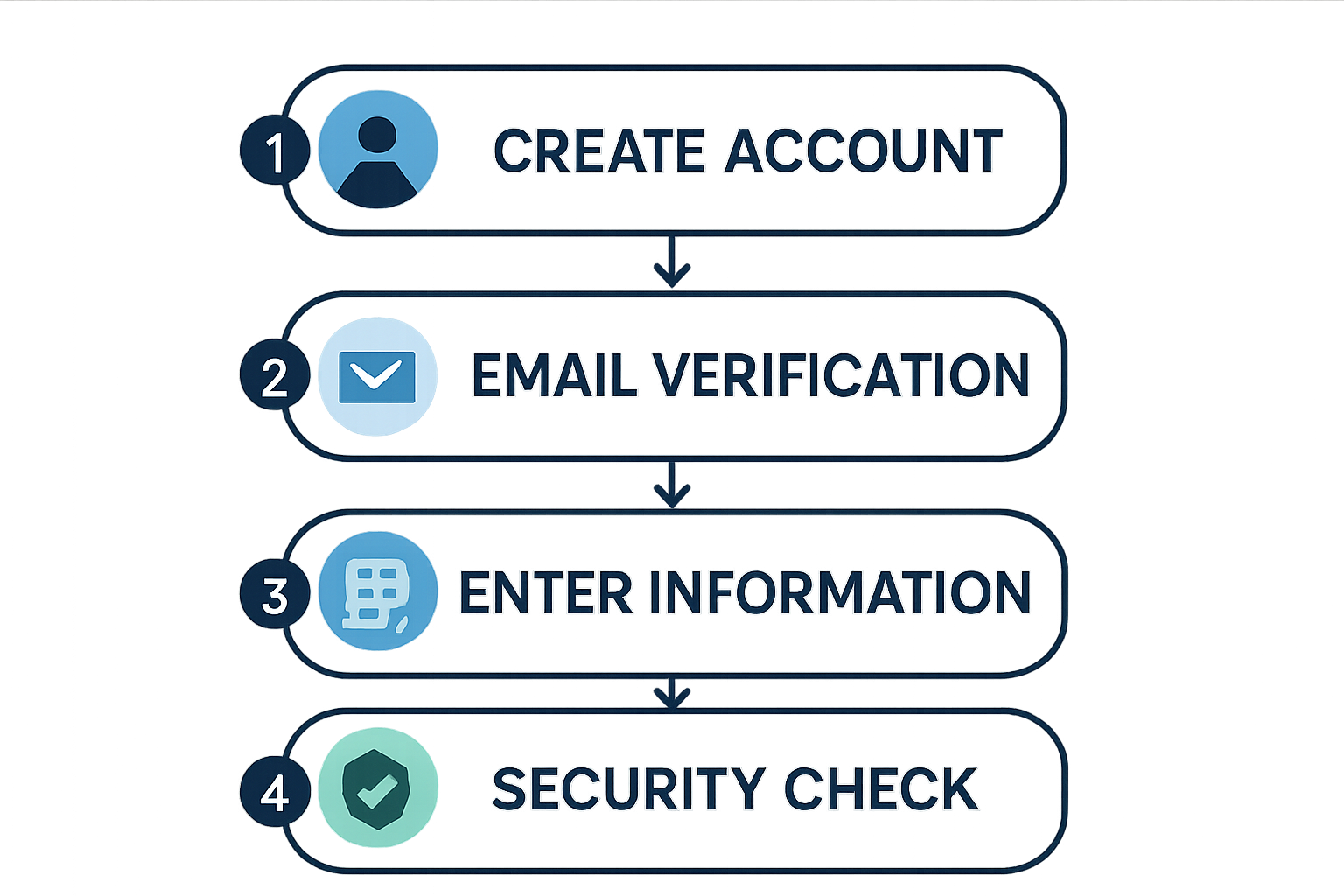
Creating Your CLAT Account: Step-by-Step Process
Account creation initiates the formal CLAT 2026 registration process. In 2025, over 23% of applicants encountered login difficulties stemming from account setup errors. Following systematic procedures prevents these complications.
Step-by-Step Account Setup
Step 1: Access Official Portal
- Navigate to consortiumofnlus.ac.in (bookmark this URL)
- Verify website authenticity (check SSL certificate and official domain)
- Avoid third-party websites or unofficial portals
- Use updated browsers: Chrome 90+, Firefox 88+, Safari 14+, Edge 90+
Step 2: Initiate New Registration
- Click “New Registration” or “Register for CLAT 2026” button
- Read instructions carefully before proceeding
- Note the registration number format for future reference
Step 3: Enter Primary Details
Required information includes:
- Full legal name (exactly as per Class 10 certificate)
- Date of birth (DD/MM/YYYY format)
- Gender
- Primary email address (active and regularly monitored)
- Mobile number (Indian +91 numbers only)
- State of residence
Critical Guidelines:
- Use personal email addresses (avoid shared family emails)
- Ensure mobile number accepts OTPs (disable DND services temporarily)
- Double-check spelling of name before submission
- Email and mobile number cannot be changed after registration
Step 4: OTP Verification
The system sends One-Time Passwords to both email and mobile:
- Email OTP: Arrives within 2 minutes (check spam/junk folders)
- SMS OTP: Delivered within 30 seconds to 2 minutes
- Validity: 10 minutes from generation
- Attempts: Maximum 3 OTP requests per hour
OTP Troubleshooting:
If OTP doesn’t arrive:
- Wait full 2 minutes before requesting resend
- Check network connectivity
- Verify email/mobile number entered correctly
- Disable DND (Do Not Disturb) services
- Try alternative browser or device
Step 5: Password Creation
Create a strong password meeting these criteria:
- Minimum 8 characters, maximum 15 characters
- At least one uppercase letter (A-Z)
- At least one lowercase letter (a-z)
- At least one number (0-9)
- At least one special character (@, #, $, %, &, *)
- No spaces allowed
Password Best Practices:
- Avoid common words or personal information
- Don’t use sequential characters (123, abc)
- Store password securely (password manager recommended)
- Never share credentials with anyone
Step 6: Security Question Setup
Select security questions for account recovery:
- Choose questions with memorable, unchanging answers
- Avoid easily guessable responses
- Record answers securely for future reference
Step 7: Account Activation Confirmation
- System generates unique application/registration number
- Save this number immediately (required for all future logins)
- Download and print the registration confirmation page
- Verify email confirmation receipt
Common Registration Errors and Solutions
Error 1: OTP Delivery Failures
Causes:
- DND (Do Not Disturb) activated on mobile number
- Network connectivity issues
- Incorrect mobile number entry
- Server congestion during peak hours
Solutions:
- Deactivate DND by sending SMS “START 0” to 1909
- Switch between WiFi and mobile data
- Verify mobile number includes correct country code (+91)
- Attempt registration during off-peak hours (early morning or late evening)
Statistical insight: 68% of OTP issues in 2025 stemmed from secondary or inactive mobile numbers.
Error 2: Browser Compatibility Problems
Incompatible Browsers:
- Internet Explorer (all versions)
- Safari versions below 14.0
- Chrome versions below 85
- Outdated mobile browsers
Solutions:
- Update browser to latest version
- Clear browser cache and cookies
- Disable ad-blockers and pop-up blockers
- Try incognito/private browsing mode
- Switch to recommended browsers (Chrome or Firefox)
Error 3: Password Validation Failures
Common Mistakes:
- Missing special characters
- Spaces in password
- Exceeding character limits
- Using restricted special characters
Solutions:
- Follow exact password criteria
- Use password generators for compliant passwords
- Test password in notepad before entering
- Copy-paste to avoid typing errors
Error 4: Session Timeout Issues
The portal automatically logs out after 15 minutes of inactivity.
Prevention:
- Complete each section without prolonged breaks
- Save progress frequently if option available
- Keep document files ready before starting
- Avoid multitasking during registration
Error 5: Duplicate Registration Attempts
System rejects multiple registrations from same email/mobile.
Resolution:
- Use “Forgot Password” for account recovery
- Contact helpdesk with supporting documents
- Provide original registration number if available
Account Security Recommendations
Protect Your Credentials:
- Never share login details with coaching centers or consultants
- Beware of phishing emails requesting password resets
- Verify all communication originates from official @consortiumofnlus.ac.in domain
- Enable two-factor authentication if available
Regular Account Monitoring:
- Log in weekly to check for updates
- Verify no unauthorized changes to application
- Download and save all system-generated communications
After successful account creation, proceed immediately to application form completion. The system may log out automatically if left inactive.
For additional preparation insights, review CLAT 2026 exam analysis to understand examination patterns.
Completing the CLAT Application Form: Section-by-Section Guide
The application form contains multiple sections requiring precise information entry. Errors during this stage cause delays, rejections, or incorrect center allocations.
Personal Information Section
This section captures demographic and contact details.
Name Entry Protocol:
- Enter name exactly as it appears on Class 10 certificate
- Include middle names if present on certificate
- Avoid nicknames, abbreviations, or shortened versions
- Use uppercase letters if certificate uses uppercase
Example:
- Certificate Name: MOHAMMED ABDUL RAHMAN KHAN
- Correct Entry: MOHAMMED ABDUL RAHMAN KHAN
- Incorrect: M.A.R. Khan or Abdul Khan
Parent/Guardian Information:
- Father’s full name
- Mother’s full name
- Guardian’s name (if applicable)
- Parent occupation and annual income (for EWS verification)
Contact Details Verification:
- Primary mobile number (receives exam updates)
- Alternative mobile number (optional but recommended)
- Primary email address (all official communication)
- Alternative email address
- Permanent address with PIN code
- Correspondence address (if different from permanent)
Examination Center Selection:
Choose three center cities in order of preference:
| Preference | Strategy | Rationale |
|---|---|---|
| First | City of residence or nearest metro | Minimizes travel stress |
| Second | Alternative nearby city | Backup if first choice unavailable |
| Third | Any accessible city | Ensures allocation |
2024 Center Allocation Statistics:
- 84% of candidates received first or second choice
- 12% assigned third choice
- 4% allocated alternative centers due to capacity constraints
Major cities (Delhi, Mumbai, Bangalore, Kolkata, Chennai) fill rapidly. Submit applications early for better center allocation.
Educational Qualifications Entry
School Education Details:
- Class 10 Information
- Board name (select from dropdown)
- Roll number
- Year of passing
- Percentage/CGPA
- School name and address
- Class 12 Information
- Board name
- Roll number
- Year of passing/appearing
- Percentage/CGPA
- Stream (Science/Commerce/Arts/Humanities)
- School name and address
Percentage Calculation Rules:
- Enter actual percentage without rounding
- For CGPA systems, use official conversion formula
- CBSE: CGPA × 9.5 = Percentage
- State boards: Follow board-specific conversion
International Board Conversions:
| Board | Conversion Requirement |
|---|---|
| Cambridge A-Levels | AIU equivalence certificate mandatory |
| International Baccalaureate (IB) | Official conversion from IB organization |
| American High School | NIOS equivalence certificate |
Upload conversion certificates in additional documents section.
For Postgraduate Applicants:
- LLB university name
- Degree type (3-year/5-year integrated)
- Year of passing/appearing
- Aggregate percentage
- University roll number
- Specialization (if any)
National Law University Preference Selection
This section determines admission allocation based on CLAT rank.
Strategic Preference Order:
Tier 1 (Rank 1-500): Dream NLUs
- NLSIU Bangalore
- NALSAR Hyderabad
- WBNUJS Kolkata
- NLU Delhi
- GNLU Gandhinagar
Tier 2 (Rank 500-2000): Target NLUs
- RGNUL Patiala
- HNLU Raipur
- NUALS Kochi
- RMLNLU Lucknow
- NLU Jodhpur
Tier 3 (Rank 2000-5000): Safe Options
- CNLU Patna
- DSNLU Visakhapatnam
- TNNLU Tiruchirappalli
- MNLU Mumbai
- NLU Odisha
Preference Selection Best Practices:
- Research Historical Cutoffs
- Analyze previous 3 years’ closing ranks
- Consider category-wise variations
- Account for seat matrix changes
- Evaluate Location Preferences
- Climate adaptability
- Distance from home
- City infrastructure and safety
- Assess Academic Strengths
- Faculty expertise in desired specialization
- Research opportunities
- Moot court and internship culture
- Consider Career Goals
- Corporate law: NLSIU, NALSAR, NLU Delhi
- Litigation: WBNUJS, RGNUL
- Public policy: NLU Delhi, NLSIU
- Academia: NALSAR, WBNUJS
2024 Preference Statistics:
- 92% of candidates secured admission in top 3 preferences
- 6% admitted to preferences 4-6
- 2% allocated to lower preferences or waitlisted
Preference Change Policy:
- Preferences can be modified during correction window only
- No changes permitted after correction window closes
- Order changes don’t require additional fees
Understand CLAT 2026 NLU cutoff predictions for informed preference selection.
Additional Information Section
Category Declaration:
- Select applicable category (General/SC/ST/OBC-NCL/EWS)
- PwD status declaration
- BPL status (if applicable)
- Kashmiri Migrant status
- Defense personnel ward status
Language Preference:
CLAT offers question paper in:
- English
- Hindi
Select preferred language (cannot be changed after submission).
Communication Preferences:
- Opt-in for SMS updates
- Email notification preferences
- Correspondence language
Complete all mandatory fields marked with asterisks (*). Incomplete sections prevent form submission.
Document Upload Process: Technical Requirements and Troubleshooting
Document upload failures account for the highest percentage of registration rejections. Understanding technical specifications prevents these issues.
File Size Requirements
Strict size limits apply to all uploads:
Photographs:
- Minimum: 50KB
- Maximum: 100KB
- Ideal: 70-80KB
Signatures:
- Minimum: 20KB
- Maximum: 50KB
- Ideal: 30-40KB
Certificates (PDF):
- Minimum: 100KB
- Maximum: 1.5MB per document
- Ideal: 500KB-1MB
Compression Without Quality Loss:
Tools for file size reduction:
- For Images:
- Squoosh.app (web-based, free)
- TinyPNG (batch processing)
- Adobe Photoshop (professional option)
- For PDFs:
- ILovePDF (online compression)
- Adobe Acrobat Pro
- Smallpdf.com
Compression Settings:
- JPEG quality: 85-90%
- PDF compression: Medium quality
- Color profile: sRGB for photos
- Resolution: 300 DPI maintained
Format Specifications
Accepted formats vary by document type:
| Document Type | Accepted Format | Dimensions | Background | Color Mode |
|---|---|---|---|---|
| Photograph | JPEG only | 200×230 pixels | Pure white | RGB |
| Signature | PNG/JPEG | 140×60 pixels | White/Transparent | Grayscale |
| Certificates | PDF only | A4 size | N/A | Color/Grayscale |
| ID Proofs | PDF only | Original size | N/A | Color |
Photograph Specifications:
- Recent capture (within 3 months)
- Face coverage: 70-80% of frame
- Head position: Centered, facing camera
- Expression: Neutral, mouth closed
- Eyes: Open, clearly visible
- Glasses: Allowed if regularly worn (no glare)
- Head covering: Religious headwear permitted (face must be visible)
- Background: Pure white without shadows
- Lighting: Even, no harsh shadows
Signature Specifications:
- Medium: Black or blue ink on white paper
- Style: Candidate’s usual signature (not block capitals)
- Size: Clearly visible, not cramped
- Scan: High contrast, no background noise
- Position: Centered in frame
Certificate Scanning Guidelines:
- Orientation: Portrait mode
- Alignment: Straight, not tilted
- Coverage: All four corners visible
- Clarity: Text readable at 100% zoom
- Seals: Official stamps clearly visible
- Multi-page: Combine into single PDF
Troubleshooting Upload Errors
Error: “File size exceeds maximum limit”
Solutions:
- Compress file using recommended tools
- Reduce image resolution slightly (maintain 200 DPI minimum)
- Convert color PDFs to grayscale if acceptable
- Remove unnecessary pages from multi-page PDFs
Error: “Invalid file format”
Solutions:
- Verify file extension matches requirements
- Convert files using official tools (not just renaming)
- Re-scan documents in correct format
- Use online conversion tools (e.g., JPG to PDF converters)
Error: “Image dimensions do not match requirements”
Solutions:
- Use image editing software to resize exactly
- Maintain aspect ratio during resizing
- Crop unnecessary borders
- Use online tools like Pixlr or Photopea for precise dimensions
Error: “Upload failed – try again”
Causes and Solutions:
| Cause | Solution |
|---|---|
| Slow internet connection | Switch to stable broadband; avoid mobile data |
| Browser cache issues | Clear cache and cookies; try incognito mode |
| Server congestion | Attempt during off-peak hours (early morning) |
| File corruption | Re-scan or re-save document |
| Antivirus interference | Temporarily disable antivirus during upload |
Upload Attempt Limits:
- Maximum 3 attempts per document field
- After 3 failures, wait 30 minutes before retrying
- Contact helpdesk if persistent failures occur
Browser-Specific Issues:
Chrome:
- Enable JavaScript
- Disable extensions during upload
- Update to latest version
Firefox:
- Clear recent history
- Disable strict tracking protection temporarily
- Allow pop-ups from consortiumofnlus.ac.in
Safari:
- Enable file upload permissions
- Clear website data
- Update to macOS-compatible version
File Naming Best Practices:
- Use only alphanumeric characters
- Avoid special characters (except underscore and hyphen)
- Keep names under 50 characters
- Use descriptive names for easy identification
Pre-Upload Verification Checklist:
- File size within specified limits
- Correct file format
- Proper dimensions (for images)
- Clear, legible content
- No password protection on PDFs
- Correct orientation
- All pages included (for multi-page documents)
Post-Upload Verification:
After successful upload:
- Preview uploaded document in portal
- Verify clarity and completeness
- Check for correct document in correct field
- Download preview to confirm accuracy
The system allows document replacement during correction window if errors are detected post-submission.
For comprehensive preparation beyond registration, explore high-yield GK topics for CLAT 2026.
Payment Process: Fee Structure and Transaction Guidelines
Payment completion finalizes CLAT 2026 registration. Twelve percent of incomplete applications in 2025 resulted from payment failures.
Fee Structure Breakdown
Undergraduate Program (BA LLB) Fees:
| Category | Registration Fee | GST (18%) | Total Payable |
|---|---|---|---|
| General | ₹3,389 | ₹610 | ₹4,000 |
| OBC-NCL | ₹3,389 | ₹610 | ₹4,000 |
| SC | ₹2,966 | ₹534 | ₹3,500 |
| ST | ₹2,966 | ₹534 | ₹3,500 |
| BPL | ₹0 | ₹0 | Waived |
Postgraduate Program (LLM) Fees:
| Category | Registration Fee | GST (18%) | Total Payable |
|---|---|---|---|
| General | ₹3,389 | ₹610 | ₹4,000 |
| OBC-NCL | ₹3,389 | ₹610 | ₹4,000 |
| SC | ₹2,966 | ₹534 | ₹3,500 |
| ST | ₹2,966 | ₹534 | ₹3,500 |
Fee Waiver Eligibility:
BPL (Below Poverty Line) candidates receive complete fee waiver upon submission of:
- Valid BPL ration card
- State government BPL certificate
- Annual family income certificate (below ₹1 lakh)
Non-Refundable Policy:
Registration fees are non-refundable under any circumstances:
- Cancellation of application
- Non-appearance in examination
- Disqualification
- Duplicate registration
Accepted Payment Methods
The CLAT portal accepts multiple payment modes:
1. Debit Cards
Accepted networks:
- Visa
- Mastercard
- RuPay
- Maestro
Transaction Charges:
- HDFC Bank: 1% of transaction value
- SBI: ₹10 + GST flat fee
- Other banks: 0.75-1.5% varies by bank
2. Credit Cards
Accepted networks:
- Visa
- Mastercard
- American Express
- Diners Club
Transaction Charges:
- Typically 1-2% of transaction value
- Varies by issuing bank
3. Net Banking
All major banks supported:
- Public sector banks (SBI, PNB, BOB, Canara, etc.)
- Private sector banks (HDFC, ICICI, Axis, Kotak, etc.)
- Cooperative banks (limited support)
Transaction Charges:
- Usually ₹10-20 flat fee
- Some banks offer zero charges
4. UPI (Unified Payments Interface)
Supported UPI apps:
- Google Pay
- PhonePe
- Paytm
- BHIM
- Bank-specific UPI apps
Transaction Charges:
- Typically zero for UPI transactions
- Recommended for cost-effective payment
5. Digital Wallets
Limited wallet support:
- Paytm Wallet
- Mobikwik
Transaction Charges:
- 1-2% convenience fee
Payment Process Step-by-Step
Step 1: Fee Calculation Verification
- System automatically calculates fee based on selected category
- Verify amount before proceeding
- Check for any additional transaction charges
Step 2: Payment Mode Selection
- Choose preferred payment method
- Consider transaction charges
- Ensure sufficient balance/credit limit
Step 3: Gateway Redirection
- Portal redirects to payment gateway
- Do not refresh or close browser
- Do not press back button
- Wait for complete page load (may take 30-60 seconds)
Step 4: Payment Details Entry
Enter required information:
- Card number (16 digits)
- Expiry date (MM/YY)
- CVV (3-digit security code)
- Cardholder name
- OTP for authentication
Step 5: Transaction Authentication
- Enter OTP received on registered mobile
- OTP validity: 10 minutes
- Maximum 3 OTP attempts
Step 6: Payment Confirmation
- Wait for success message
- Do not close browser until confirmation
- Transaction may take 2-5 minutes to process
Step 7: Receipt Generation
- System generates payment receipt automatically
- Download and save receipt PDF
- Note transaction ID/reference number
Payment Troubleshooting
Issue: Payment Failed but Amount Debited
Causes:
- Network interruption during transaction
- Gateway timeout
- Bank server issues
Resolution:
- Wait 24-48 hours for auto-refund
- Check bank account for reversal
- If amount not refunded, contact helpdesk with:
- Transaction ID
- Bank reference number
- Screenshot of debit message
- Payment receipt (if generated)
Issue: Payment Gateway Not Loading
Solutions:
- Disable pop-up blockers
- Clear browser cache
- Try different browser
- Check internet stability
- Attempt during off-peak hours
Issue: Transaction Declined by Bank
Common Reasons:
| Reason | Solution |
|---|---|
| Insufficient balance | Add funds and retry |
| Daily transaction limit exceeded | Use different card or wait 24 hours |
| International transactions disabled | Enable online transactions in net banking |
| Card expired | Use valid card |
| Incorrect CVV/OTP | Re-enter carefully |
Issue: Duplicate Payment
If accidentally charged twice:
- Check transaction history in portal
- Verify both transactions in bank statement
- Contact helpdesk immediately with both transaction IDs
- Refund processed within 7-10 working days
Payment Verification
After successful payment:
Immediate Verification:
- Check for payment confirmation email
- Verify SMS confirmation from bank
- Download payment receipt from portal
Portal Verification:
- Log in to CLAT account
- Navigate to “Payment Status” section
- Confirm status shows “Payment Successful”
- Verify transaction details match bank statement
Receipt Details:
Payment receipt includes:
- Candidate name and registration number
- Transaction ID and date
- Amount paid
- Payment mode
- Bank reference number
- Receipt number
Important:
- Save transaction ID for minimum 6 months
- Required for fee-related queries
- Needed during counseling process
- Proof of payment for admission
Bank Statement Monitoring:
- Transaction reflects within 24 hours
- Check for correct amount deduction
- Verify merchant name: “Consortium of NLUs” or similar
- Report discrepancies within 48 hours
Payment completion enables final application submission. Proceed immediately to submission after payment verification.
For strategic preparation planning, review CLAT 2026 study strategies.
Final Submission: Verification and Confirmation
The final submission stage requires meticulous verification. Errors discovered post-submission can only be corrected during the limited correction window.
Pre-Submission Verification Checklist
Personal Information Verification (12 Points):
- Name matches Class 10 certificate exactly
- Date of birth correct (DD/MM/YYYY format)
- Gender selection accurate
- Father’s name spelled correctly
- Mother’s name spelled correctly
- Email address active and monitored
- Mobile number receives SMS
- Permanent address complete with PIN code
- Correspondence address verified
- Category selection matches certificates
- PwD status declared if applicable
- Examination center preferences finalized
Academic Information Verification (8 Points):
- Class 10 board name correct
- Class 10 percentage/CGPA accurate
- Class 12 board name correct
- Class 12 percentage/CGPA accurate
- Passing year correct
- School names spelled correctly
- Roll numbers entered accurately
- Stream selection appropriate
Document Upload Verification (11 Points):
- Photograph meets specifications
- Signature clearly visible
- Class 10 marksheet uploaded
- Class 12 certificate uploaded
- ID proof attached
- Category certificate (if applicable)
- PwD certificate (if applicable)
- EWS certificate (if applicable)
- All documents legible and complete
- Correct documents in correct fields
- File sizes within limits
NLU Preference Verification (5 Points):
- Preference order reflects actual choices
- All desired NLUs included
- Preferences ranked strategically
- No duplicate selections
- Minimum 3 preferences selected
Payment Verification (4 Points):
- Payment status shows “Successful”
- Transaction ID saved
- Payment receipt downloaded
- Amount matches category fee
Application Preview Process
Before final submission:
Step 1: Access Preview Mode
- Click “Preview Application” button
- System generates comprehensive application summary
- Review appears in read-only format
Step 2: Section-by-Section Review
Carefully examine each section:
- Personal Details Page
- Verify every field for accuracy
- Check for typos or spelling errors
- Confirm contact information
- Academic Details Page
- Cross-check with original marksheets
- Verify percentage calculations
- Confirm board selections
- Document Upload Page
- Preview each uploaded document
- Verify clarity and completeness
- Ensure correct orientation
- Preference Page
- Confirm NLU order
- Verify no missing preferences
- Check for strategic alignment
- Payment Page
- Confirm payment completion
- Verify transaction details
- Check receipt availability
Step 3: Error Identification
If errors detected:
- Click “Edit” or “Modify” button
- Navigate to incorrect section
- Make necessary corrections
- Re-upload documents if needed
- Return to preview mode
- Repeat verification process
Step 4: Final Confirmation
Once satisfied with all details:
- Read declaration statement carefully
- Understand terms and conditions
- Accept declaration by checking box
- Click “Final Submit” button
Declaration Statement Includes:
- Accuracy of information provided
- Authenticity of uploaded documents
- Acceptance of CLAT rules and regulations
- Understanding of non-refund policy
- Consent for data processing
- Agreement to abide by NLU decisions
Saving PDF Confirmation
Immediate Post-Submission Actions:
Step 1: Download System-Generated PDF
- Confirmation page displays after successful submission
- Click “Download Confirmation Page” button
- PDF generates automatically
- Save with descriptive filename:
CLAT2026_Confirmation_[YourName]_[RegNumber].pdf
Step 2: Password Protection
Secure the PDF:
- Use PDF editing software (Adobe Acrobat, PDF24)
- Apply password protection
- Use strong, memorable password
- Store password securely (password manager recommended)
Step 3: Multiple Backup Copies
Save confirmation PDF in:
- Local Computer
- Desktop folder
- Documents folder
- External hard drive
- Cloud Storage
- Google Drive
- Dropbox
- OneDrive
- iCloud
- Email
- Send to personal email
- Send to alternative email
- Mark as important/starred
- Physical Copy
- Print high-quality copy
- Store in document folder
- Keep with other CLAT materials
Confirmation PDF Contains:
- Unique application/registration number
- Candidate photograph and signature
- Complete personal details
- Academic qualifications
- NLU preferences in order
- Examination center preferences
- Category and reservation details
- Payment transaction details
- Submission date and time
- Declaration acceptance confirmation
Critical Importance:
This PDF serves as:
- Proof of successful registration
- Reference during correction window
- Required document for admit card issues
- Necessary for counseling process
- Evidence for dispute resolution
Server Congestion Management
Peak Traffic Periods:
Historical data shows highest traffic during:
- First 3 days after portal opening
- Final 48 hours before deadline
- Evening hours (6 PM – 11 PM IST)
Optimal Submission Times:
- Early morning (6 AM – 9 AM IST)
- Late night (11 PM – 2 AM IST)
- Weekday afternoons (2 PM – 4 PM IST)
Congestion Indicators:
- Slow page loading (30+ seconds)
- Frequent timeout errors
- Payment gateway delays
- Document upload failures
If Experiencing Congestion:
- Don’t Panic
- Deadline allows sufficient buffer time
- System capacity increases during peak periods
- Wait and Retry
- Close browser completely
- Wait 30-60 minutes
- Attempt during off-peak hours
- Alternative Approach
- Use different device
- Try mobile data instead of WiFi
- Switch browsers
- Contact Helpdesk
- Report persistent technical issues
- Provide screenshot of errors
- Note exact error messages
Final Submission Statistics (2025):
- 43% submitted in final week
- 18% submitted in final 48 hours
- 7% experienced technical difficulties during peak hours
- 2% required helpdesk intervention
Recommendation:
Complete final submission at least 5 days before deadline to avoid:
- Server congestion
- Last-minute technical issues
- Payment gateway problems
- Stress and anxiety
After successful submission, registration process completes. Proceed to post-registration activities.
Post-Registration Activities: Corrections, Admit Card, and Support
Registration completion initiates the next phase: monitoring, corrections, and admit card preparation.
Correction Window Process
The Consortium provides a limited correction window for error rectification.
Correction Window Timeline:
- Opens: Approximately 7-10 days after registration deadline
- Duration: 72 hours (3 days) only
- Closes: Automatically at specified date/time (no extensions)
Eligible Corrections:
Permitted Changes:
- Personal Details
- Name spelling corrections (with supporting documents)
- Parent/guardian name corrections
- Date of birth (with proof)
- Gender (with legal documentation)
- Contact information (email/mobile)
- Address details
- Academic Information
- Percentage/CGPA corrections
- Board name corrections
- Roll number corrections
- School name corrections
- Passing year (with proof)
- Document Uploads
- Replace incorrect documents
- Upload missing documents
- Improve document quality
- Correct orientation issues
- NLU Preferences
- Change preference order
- Add new preferences
- Remove preferences
- Modify examination center choices
Non-Permitted Changes:
- Category changes (SC/ST/OBC/General/EWS)
- PwD status modifications
- Payment-related changes
- Examination date/shift preferences
Correction Limitations:
- Maximum 3 modifications allowed
- Each field can be edited only once
- Supporting documents required for major changes
- No corrections after window closes
Correction Process:
Step 1: Access Correction Portal
- Log in with registration credentials
- Navigate to “Correction Window” section
- System displays editable fields
Step 2: Make Modifications
- Select field requiring correction
- Enter corrected information
- Upload supporting documents if required
- Save changes
Step 3: Verification
- Preview modified application
- Verify all corrections accurate
- Check for new errors introduced
Step 4: Final Submission
- Submit corrected application
- Download updated confirmation PDF
- Save with new timestamp
Supporting Documents for Corrections:
| Correction Type | Required Document |
|---|---|
| Name change | Gazette notification or affidavit |
| Date of birth | Birth certificate or Class 10 certificate |
| Category change | Not permitted |
| Academic details | Updated marksheet or school certificate |
| Contact details | No document required |
Correction Window Statistics (2025):
- 34% of applicants used correction window
- 67% made single correction
- 28% made multiple corrections
- 5% exceeded modification limits
Important Notes:
- Set reminders for correction window dates
- Prepare supporting documents in advance
- Don’t wait until final hours
- Verify corrections immediately after submission
Admit Card Download Timeline
Admit cards release approximately 2 weeks before examination date.
Release Schedule:
- Tentative Release: Mid-November 2025
- Exact Date: Announced via email and SMS
- Availability: 24/7 download access
- Deadline: Available until examination date
Admit Card Download Process:
Step 1: Portal Access
- Visit consortiumofnlus.ac.in
- Navigate to “Admit Card” section
- Click “Download Admit Card” link
Step 2: Login Authentication
Enter credentials:
- Application/Registration number
- Date of birth (DD/MM/YYYY format)
- Password (if required)
Step 3: Download
- System generates admit card PDF
- Download begins automatically
- Save with descriptive filename
Step 4: Verification
Verify admit card contains:
- Candidate photograph and signature
- Full name and registration number
- Examination date and time
- Examination center details (name, address, code)
- Reporting time
- Instructions for examination day
- Barcode/QR code for verification
Step 5: Printing
- Print on A4 size paper
- Use quality printer (clear, legible print)
- Print multiple copies (minimum 2)
- Avoid color printouts (black and white acceptable)
Admit Card Discrepancy Resolution:
Common Issues:
- Photograph Not Visible
- Download again
- Try different browser
- Contact helpdesk with screenshot
- Incorrect Personal Details
- Verify against registration confirmation
- Contact helpdesk immediately
- Provide supporting documents
- Examination Center Different from Preference
- Allocation based on availability
- No changes permitted after admit card release
- Plan travel accordingly
- Download Errors
- Clear browser cache
- Use updated browser
- Try during off-peak hours
- Contact technical support
Admit Card Availability Issues:
If admit card not available on release date:
- Wait 24 Hours
- System updates in batches
- Some candidates receive later
- Check Email
- Admit card may be emailed
- Check spam/junk folders
- Verify Payment Status
- Unpaid applications don’t receive admit cards
- Check payment confirmation
- Contact Helpdesk
- Provide registration number
- Explain issue clearly
- Follow up regularly
Examination Day Requirements:
Carry to examination center:
- Admit card (printed copy)
- Valid photo ID (original)
- Aadhaar card
- PAN card
- Passport
- Driving license
- Voter ID
- Additional passport photographs (2 copies)
- Transparent water bottle (label removed)